 MixSwitch
 0.2.0 · Beta
Keep typing. We’ll fix the layout.
Forgot to switch languages? MixSwitch turns ghbdtn into привет and руддщ into hello. It switches the layout and plays a quiet click.
This is an early version and may make mistakes. Please report them to help improve correction accuracy. Contact
Before ghbdtn → привет
Before руддщ → hello
The example runs automatically. This website plays no sound.
Made for everyday typing
Just one file
No installation or account. Run the exe and find the icon near the clock.
Confident corrections only
MixSwitch compares two readings of a word. Uncertain cases stay as typed.
Your text stays with you
No network code or typing diary. Text is processed only in memory; only settings, Own words and exclusions are saved to disk.
Undo with one key
Press Pause/Break immediately after a correction. The original word is remembered and will not be corrected again.
Convert text yourself
Pause/Break converts the last or current word. Shift + Pause/Break converts a selection and restores the clipboard.
Quiet where it matters
Stays out of password fields and excluded programs. The last word cannot be converted after Enter or Tab.
10 short sounds
Choose a sound and a volume from 0 to 100%, or switch sound off.
Optional startup
Enable startup in Settings for your current Windows user.
Settings within easy reach
Double-click the icon near the clock to open Settings. Changes take effect immediately; F1 opens Help.
Help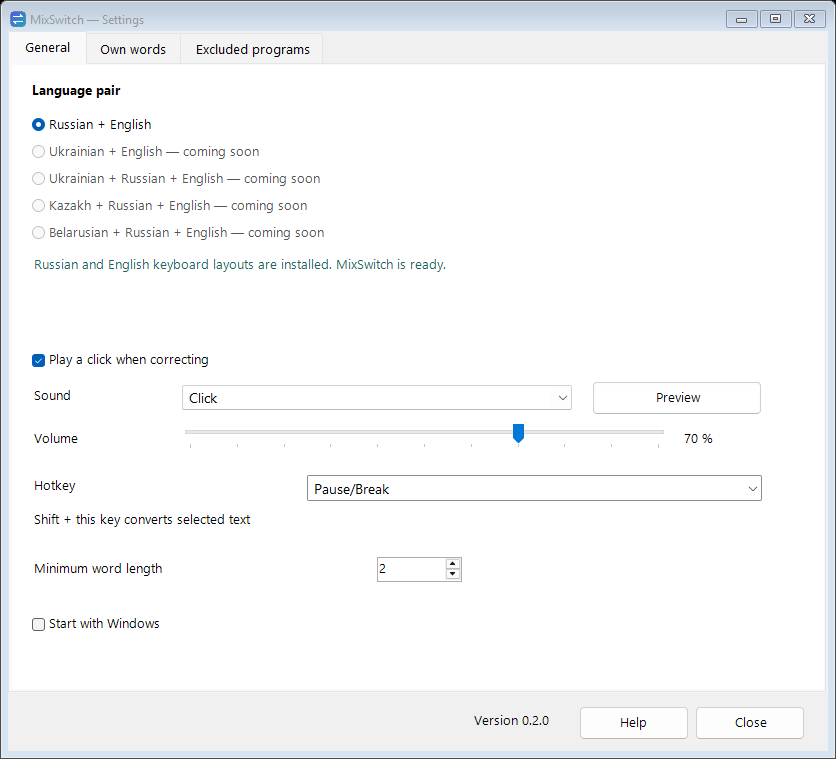
Before you start
- Windows 10/11 x64 and .NET Framework 4.8. Only Russian and English keyboard layouts are supported; more pairs are planned.
- Corrections do not work in windows running as administrator.
- Windows SmartScreen may warn about this new, unsigned program. If you trust the downloaded file: More info → Run anyway.
Try MixSwitch
Free. Extract the zip or download the exe and run it. Double-click the icon near the clock for Settings.
Questions and answers
Which languages are supported?
Only Russian and English Windows keyboard layouts. More language pairs are planned but are not available yet.
Do I need to install it?
No. Download MixSwitch.exe and run it on Windows 10/11 x64. Its icon appears near the clock.
How do I undo a wrong correction?
Immediately press Pause/Break: the original word returns and is added to Own words. Undo is unavailable after further input.
Is my text sent online?
No. The application has no network code or typing diary. Settings, Own words and exclusions are saved locally.
Why are there no corrections in a window?
MixSwitch skips password fields, excluded programs and administrator windows. Also check that both keyboard layouts are installed.
Can I turn off the click?
Yes, in the icon menu or Settings. You can also choose one of 10 sounds and adjust the volume.
Where can I find new releases?
In the release history on this website. The application does not update itself.